Lubomir Bourdev's Projects
This page describes my more significant projects during my 13+ years working at Adobe. My projects in college can be found here. Most of them are mentioned on my CV.
Poselets
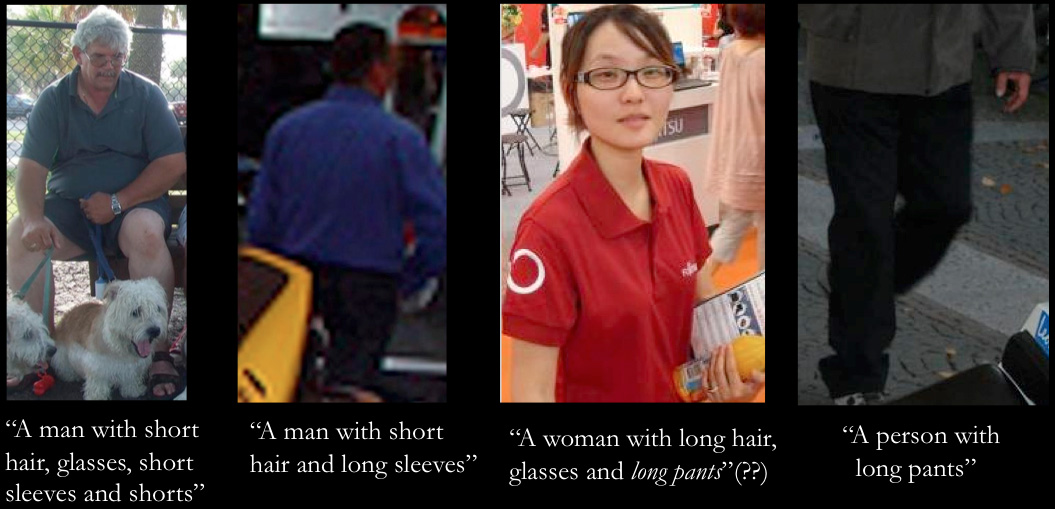
Poselets is my Ph.D. research project. They provide an intermediate- level representation of the image, which is useful for many high-level computer vision problems. For example, we currently have the most accurate person detection and segmentation methods, according to the PASCAL VOC, which is the largest and most popular computer vision competition and dataset. Poselets are effective for detecting not just people, but many visual categories - cars, bottles, horses, etc. They can tell us more about the object or person -- they can infer the pose ("torso facing front, head to the right"), the action ("running", "taking a photo", "playing an instrument"), the gender, the hair style, the style of clothes, etc. We can describe people using poselets, and this is currently the only method to infer gender without the need for a high-resolution frontal face. We have six papers on poselets and their applications in computer vision conferences.
Editing Faces
 Wouldn't it be nice to be able to "cut" an expression from one image of a person and "paste" it in another? We can make our grumpy friends smile or make everyone have a funny face. Unfortunately cut and paste is very challenging in images. Your mouth looks different even if you slightly rotate your head. Your eyes change and the entire face widens when you have a wide smile. In our project we create a 3D model of the face and decompose the identity, expression and 3D pose using our method, which we call Expression Flow. The main guy behind this work is Fei Yang, and it is a collaboration with Jue Wang, Eli Shechtman and Dimitris Metaxas. We have a SIGGRAPH 2011 paper.
Recognizing People in Photo Albums
To organize your photo album, one useful feature is to name the people in your photos. A simple way to do this, which we introduced in Adobe Elements 4 (see below) is to extract the faces and let the user label them manually. That, however, is time consuming. In 2007 I started d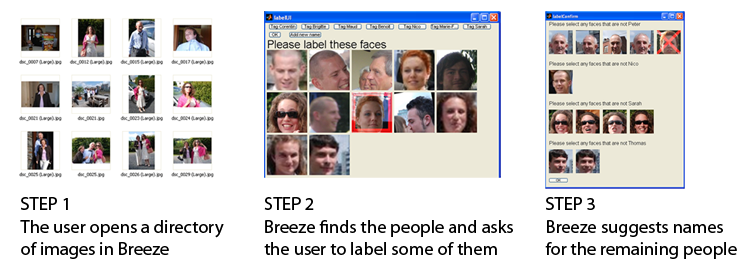 eveloping a system that uses face detection combined with face recognition, leveraging context, such as the fact that the same people on the same day tend to wear the same clothes. This was a research project for my class at U.C. Berkeley which formed the basis of the People Recognition feature in Photoshop Elements 8. Alex Parenteau and I developed the core engine, using an external face recognizer and we collaborated with the Elements engineering team. The big challenge was scalability - how do we extend the technology to very large albums with limited memory.
Face Detection
I find the topic of image understanding, and object detection in particular, very exciting. The ability to understand the semantic content of a photograph is quite valuable and highly relevant to Adobe's business. Over the last several years I have focused my research on face detection. Since Computer Vision was a new area for me, I started by reading papers and textbooks. My first experiment was a human ear detector using a neural network on the Haar wavelets of an image. It worked fairly well, but evaluating the neural network at every location and scale was too slow. I then spent some time thinking about evaluating the neural network incrementally, simultaneously at every place, and focusing the computations on the most promising areas. Although the total detection time deteriorated, this approach resulted in discovering most ears almost instantaneously and allowed for a nice tradeoff between detection rate and speed. I then generalized my idea to incrementally evaluate any learning machine (which I called the Soft Cascade).
A colleague of mine, Jonathan Brandt, was investigating the state-of-the-art Viola-Jones face detector, which had very good performance and accuracy. I decided to apply the Soft Cascade on the VJ detector, and, to my delight, the resulting syste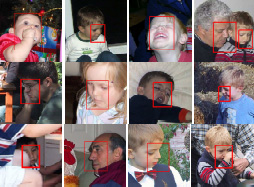 m was both faster and more accurate. It also has numerous advantages - it considers some information that the "hard cascade" throws away. The detector is less "brittle" and generalizes better, the speed/accuracy tradeoff is not hard-coded during training, but could be specified afterwards, and the new framework allows for augmenting the operational domain of an existing detector. For example, we could improve an existing detector to handle, say, wider out-of-plane rotation. My colleague observed that the ability of the Soft Cascade to be quickly calibrated for a specific point in the speed/accuracy space allows us to explore the operational domain of the detector not just along the detection rate and false positive rate, but also along the speed dimension. As far as I know, our CVPR paper was the first to describe the ROC surface of an object detector. The image on the left shows some difficult examples that my detector can handle. It still has trouble with profile faces and large head tilts, so... stay tuned!
I have further improved my face detector with a color heuristic (which uses a Bayes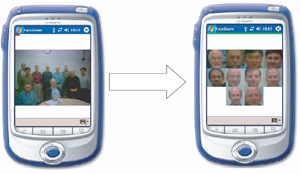 ian approach to capture the spatial and color correlation) and other heuristics for improved localization. My face detector is used in the face tagging feature of Photoshop Elements 4, which has received positive reviews. It wouldn't have happened without the help of Claire Schendel, a Photoshop engineer who integrated the feature into the product.
I have also been interested in applications of face detection in camera phones. One I am allowed to talk about is FaceZoom. The picture on the left is a prototype I have built to zoom on the faces of the people in the picture, so you can see clearly if everyone's face looks good or whether you should take another picture. I have many ideas for future research on the Soft Cascade, some of which I am pursuing currently.
Generic Programming
We at Adobe are fortunate to have Alex Stepanov, the main guy behind STL, as our colleague. He led a class on Generic Programming, which was an inspiration to all of us (find the notes here). Generic Programming is exciting because it allows for abstraction with no loss in performance. I have been collaborating with Prof. Jarvi from Texas A&M on a method for applying generic programming to create code that is generic, efficient and run-time flexible, without incurring unnecessary code bloat. Here is our LCSD paper and my presentation slides. Our approach achieves the specified goals, but has other disadvantages, namely type safety.
 One excellent application for generic programming is to abstract away the image representation and allow us to write generic image processing algorithms that work efficiently with images of any color space, channel ordering, channel depth, and pixel representation. This is the goal of my Generic Image Library - a C++ library I have created together with my colleague Hailin Jin. GIL is an open-source library under MIT license, which means that it can be used for commercial products too. It recently got accepted into the Boost libraries. I have heard from more than a dozen institutions who are using it, or at least experimenting with it. If you have used or are thinking of using GIL, I'd love to hear from you!
Acrobat Form Auto-Fill
Have you ever applied for a mortgage? After going through the experience of filling a billion forms, with the same information over an over again, I decided I have had enough and started thinking about ways of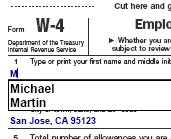 simplifying the form filling experience. I created a probabilistic framework that can suggest suitable defaults for form entries. It observes your entry patterns, learns from experience and is able to extrapolate the results to previously unseen forms. When it is fairly confident with the result, it can populate the field once you tab into it. It is now used by Adobe Acrobat to streamline the form filling process. I think it is also in the free Acrobat Reader. (You need to enable it from the preferences menu). Thanks to Alex Mohr, an Acrobat engineer, for integrating my engine into the product.
Symbolism Tools
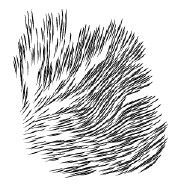 Vector graphics applications like Adobe Illustrator have been used to create some amazing art. But we have only scratched the surface of what computers can do. By building some intelligence into the tools, we could enable a new generation of art that would be too time consuming to generate and edit by hand. This idea inspired me to create the Symbolism tools - a suite of tools in Illustrator that allow for scattering, moving, "combing", coloring and applying styles to a collection of graphical symbols. These tools could be used for a variety of objects, like hair, organic shapes, pen-and-ink style of shading. I am using a particle system to guide the behavior of the tools. My manager Martin Newell gave me some insightful ideas for the underlying technology. I designed, prototyped, performance-optimized and integrated the feature into Illustrator. Here is some sample art created by these tools. The Symbolism tools have received outstanding reviews.
Flattener
When I joined Adobe in 1998, the big company initiative was introducing transparency in the vector graphics products. Transparency can be used to represent a dazzling range of effects, see-through objects, lens effects, soft clips, drop shadows... However, the biggest technical challenge was the ability to print vector graphics with transparent elements. Adobe PostScript, the universal language of printers, does not support transparency. There were two options for printing - rasterizing into an image and printing the image, or making an opaque illustration that looks just like a transparent one by sub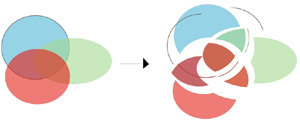 dividing the illustration into pieces (planar mapping), and drawing them with the appropriate color, as the illustration shows. Planar mapping results in higher quality printing as it remains resolution independent. However, it is easy to create vector art for which planar mapping results in many thousands of small pieces, some smaller than a pixel. Planar mapping in those cases would be unacceptably slow, and rasterization would be the only option. But how do we know if certain parts of the document are going to result in unacceptably many pieces, without actually computing the planar map? It is a chicken and egg problem. I invented an algorithm that quickly estimates which areas of the document need to be rasterized and which can be planar mapped. Also, planar mapping is a complex operation, but we can often get by without it, in places of the document that are not involved in transparency. But how do you know if an object is involved in transparency without checking to see if it intersects with transparent object, i.e. without computing the planar map? Another chicken and egg problem. I created an algorithm to analyze the document and determine which objects need to be included into the planar map, and then interleave the results of planar mapping to generate the final document. These are just a few examples of the problems I needed to resolve in the flattener. Other problems I had to resolve are how to preserve native type through planar mapping, how to preserve native gradients and gradient meshes, how to support spot color planes, how to avoid stitching problems when dealing with strokes, how to preserve patterns, how to deal with overprint, how to schedule the color computations to avoid doing them repeatedly, how to design the system so that it performs on a single pass (the output may be too big to keep in memory), how to make sure it is fail safe - i.e. if it runs our of memory, it should fall back, break the problem into smaller pieces and attempt to do it again...
I single-handedly designed and implemented the entire flattener module - the system that takes a vector graphics document containing transparency and outputs one that is visually equivalent but contains no transparency. (That does not include the planar mapping code, implemented by my colleague Steve Schiller). The flattener is now used by many of Adobe's vector products, including Illustrator, Acrobat and InDesign. It is used when printing and exporting to various formats. The flattener is also ported into high-end PDF printers (RIPs). This was by far the largest and most complex project I have ever done. It is also probably the most widely used - not just for printing labels and posters, but also big titles like the cover of Glamour magazine.
Flattening Preview
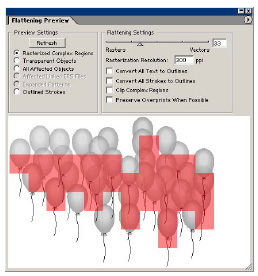 Since the flattening process is very complex and requires setting of many parameters, one of the biggest user requests was predictability - power users want to know exactly what will happen to their documents when the flattener is involved (but without spending the time to run the flattener). To address this request, I created the flattening preview module. It is a module that previews the effect of flattening. It can show you the places that get rasterized, the objects that get broken down into pieces, the text that gets affected, etc. The Illustrator team deemed it important enough to include a separate booklet describing it inside every box of Illustrator 10. InDesign followed up with their own implementation of the flattening preview prototype.
See my projects at Brown.

Last updated on November 21, 2006. This page is maintained
by Lubomir Bourdev